Messaging V2
What is FactoryFix?
FactoryFix is a Recruiting SaaS tool offered to recruiters in the manufacturing industry. Recruiters post their jobs on FactoryFix, and FactoryFix distributes them to other job boards. When candidates apply to the job boards, FactoryFix collects the candidates and their applications so recruiters can review it all in one place. The recruiters use FactoryFix to review these candidates and text the ones they're interested in through the FactoryFix's built-in text messenger straight to the candidate's phone.
Problem
Our previous messaging platform update wasn't very successful. Sure it improved the experience, but it was sluggish, tedious to use, built for small clients only and wasn't scalable. Further, the goal of the previous update to the messaging page - to let users easily review and sort through candidates - did not hit the mark with our users.
We also had to account for the integration of our Talent Search tools, meaning the solution has to be scalable.
After user feedback, we found the core problem. It's an ambitious problem, so the How Might We question needs to be equally ambitious.
Role
Interviewed users to understand their current processed and for feedback on the current platform
Did competitive research on comparable messaging tools both inside and outside the industry
Created prototypes for user testing, planned user tests and ran them
Delivered the final designs to the engineering team and worked with them to scope the first cycle deliverable
The Conversation
As with all platform updates, it came from up top. To assign the amount of people and resources towards updating your platform is a huge time and money commitment, so you can't simply advocate for it as an individual. I worked with our VP of Product Management and Design Manager to gain traction for updating and consolidating our messaging platform.
We were moving to merge the Jobs page, where users post jobs and review candidates, and the Messages page, where users contact canddiates, as the experience was disjointed.
The Buy In
As we built our new product, Talent Search (Talent Search lets users search for and hire candidates in our talent network) we were primed for a product update. Through our User Research interviews we learned users would use different parts of the platform to message, review and move candidates through stages. They also had difficult finding and following up with Talent Search candidates.
We used analytics like numbers of messages sent and which pages the messages were from to get a sample of users who had different behaviours, giving us a more rounded out view of how and why users make certain decisions.
User Research Summary
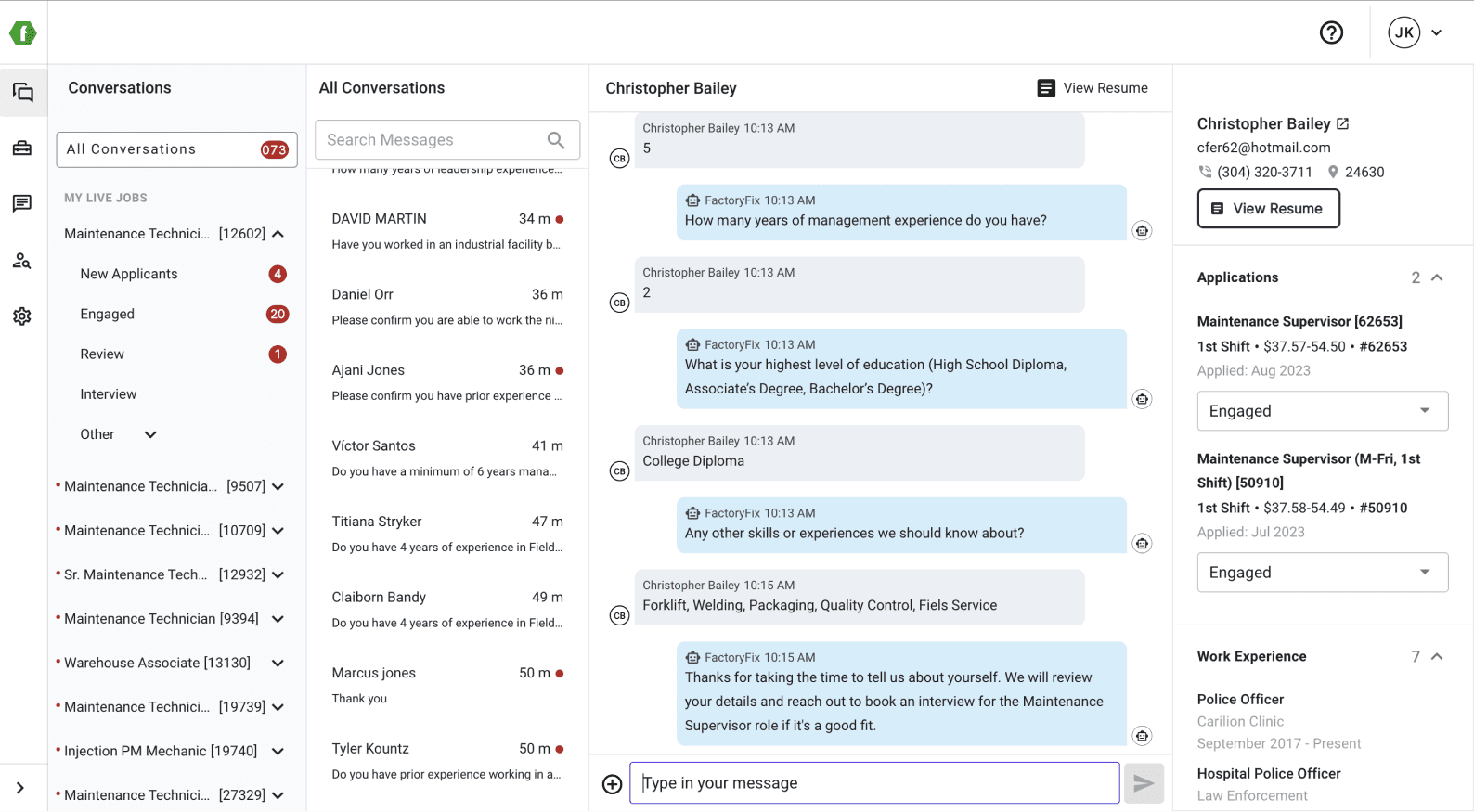
Most users reviewed and messaged their candidates in the Jobs page, our last release was meant to shift them to doing those both in the Messaging page. This also made it clear to us there was a clear need to message candidates as they're being reviewed.
Users either didn't easily understand how to review candidates in the Messaging page or missed it completely.
Users had difficulty finding candidates, this included which candidates sent them messages most recently.
Users showed a clear indication of different workflows, one being reviewing new candidates and the other being communicating with candidates in the interview process - which can't be done in the current platform for all jobs - only one job at a time.
Iterating through designs
With this being a larger project we got more time to work through different ideas. I spent my time at the start looking into competitors to see how they built different aspects of their messaging platforms and generated ideas for the possibilities of what we can do. Below you'll see some of the ideas we went through, and where we ended up for our testing process.
Key Takeaways
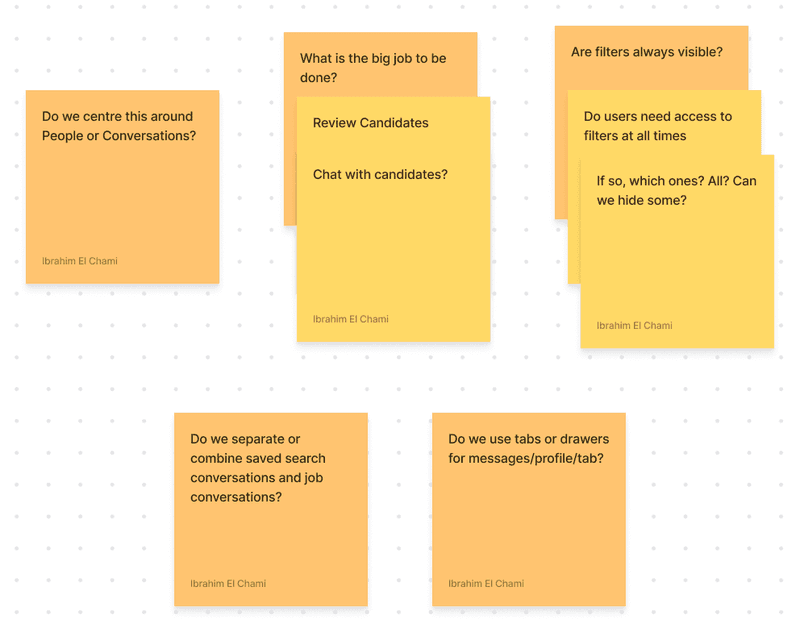
The main goals of the Conversations page are two fold, to chat with candidates and to review their skills.
We should prioritize filters by common need and usage. Most of our users are not power users.
Candidates found through Talent Search would appear on this page alongside candidates who applied, we would attach identification to them noting whether they were sourced by the user through Talent Search or applied themselves.
We decided to explore both tabs and drawers, though *spoiler alert* we settled on tabs after it was received well in the user testing.
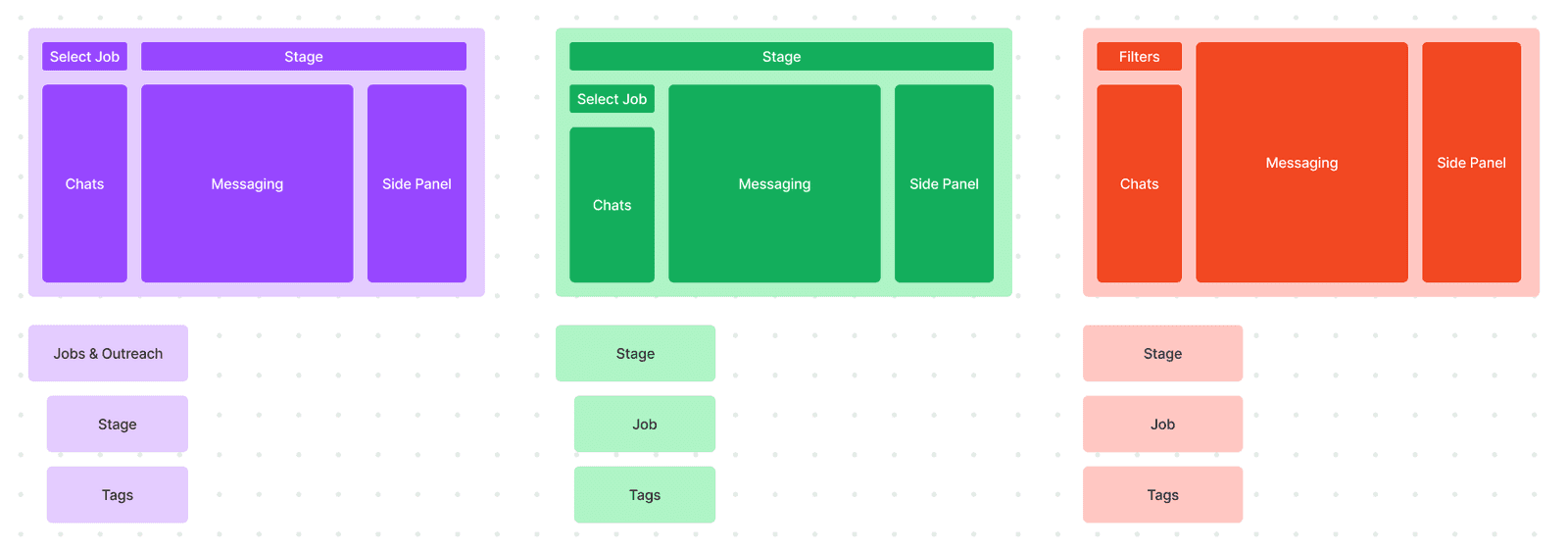
Now for the big question, hierarchy of filters. We had three options.
Select Jobs at the top then filter by application and tags.
Select Stages at the top then filter by jobs and tags.
Allow all three to exist at the same hierarchy, letting the user explore as they'd like.
We settled on the first option. Our users traditionally work on each job as opposed to each candidate. Jobs have different priorities due to requirements from stakeholders, seasonal changes, and the user's workflow itself is ultimately guided by filling a job and not passing on a candidate or moving them through stages. We rejected the third option as it spoke more to a power user model, which is not the persona of a majority of our users.
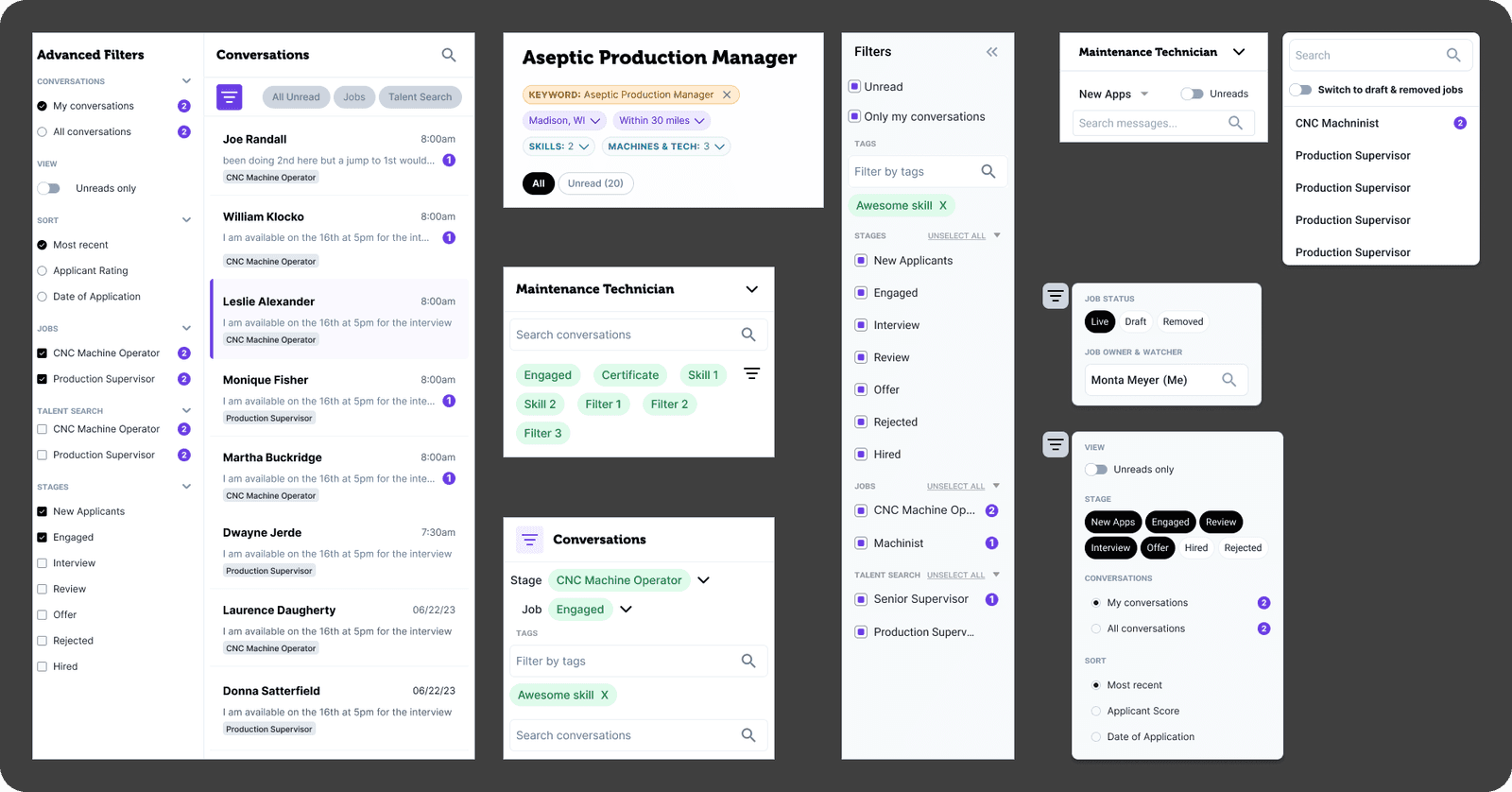
Filters Ideation
The goal of the filters is to allow users to search for specific jobs first and candidates second. This question of hierarchy of search was a difficult one to answer.
What we explored
Our goal was to expand the filters to be more useful in a recruiters workflow of reviewing candidates.
Advanced filters sidebar - Converting the existing sidenav into one that allows for more filter options.
Search Based filters - Allow users to type out what they want to search, whether it's a job, status, keyword in messages or candidate name.
Advanced + Basic Filters - Give the users options to use more advanced filters while keeping the more high tough filters up front. We went with this option.
Through this exploration we also dialed these filters into two groups, job filters and candidate filters. Job filters were important only for larger organizations with many jobs to sort through, while candidate filters were important to both large and small organizations as most of our jobs had many candidates (15 or more) to sort through.
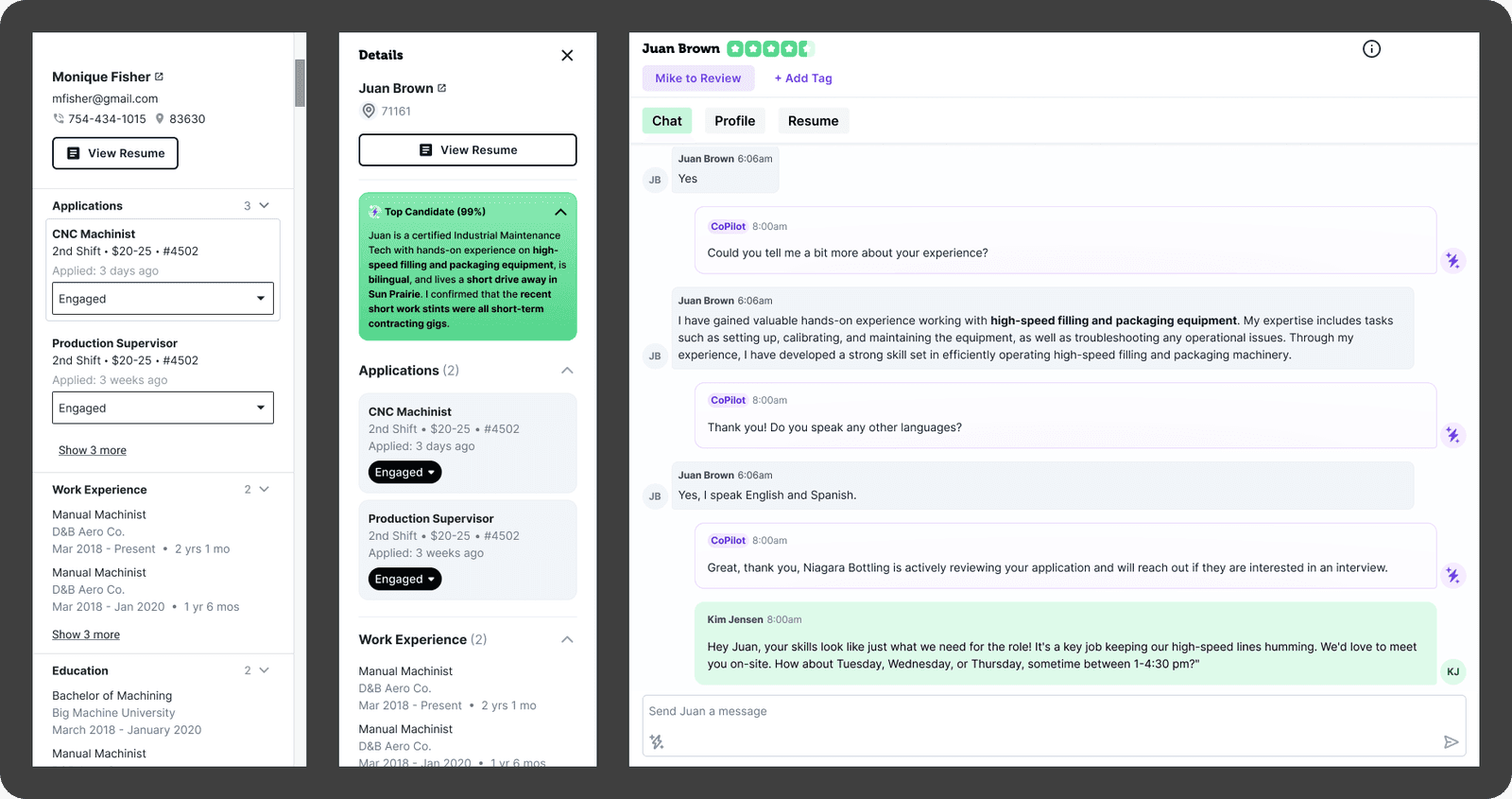
Candidate Information Panel Iteration
The Candidate Information Panel has the candidates resume, application, and a few interactions like moving the candidate between job stages. It does a lot in a very tight space, but what would make it the ideal experience for reviewing a candidate?
What we explored
Our user's main goal when entering FactoryFix is to fulfill their open manufacturing related roles with qualified talent.
The original sidebar - The original sidebar attempted to make the page a one stop shop, but through our interviews and design attempts at adding in more information - we found it only fit a limited amount of information and was overwhelming for users. Though this isn't a change, it had to be evaluated to try and dial down the scope for engineering.
Sidebar with updated visuals - To give our earlier design process the benefit of the doubt we attempted to use our new design language alongside adding in more features (like our AI candidate preview).
Tabs - Space being a repeating issue left us constantly looking back to a full page solution. Tabs seemed like the most natural fit. We went with this option.
Through this exploration we learned that we had to move away from our current layout. The constraints of the drawer left us stuffing in new features and interactions into the confined space, further hiding content important to the candidate review process.
The importance of testing
Though I think I'm a great designer, no designer's work is perfect. It's time to test our designs. This is one of my favourite parts of the process as I get to see what the user thinks of what we've worked towards. And now with Figma's new conditional prototyping features, the design behaves more like the product.
User Test Guide
A good user test guide is all about giving the user prompts in the scenarios they might have while using the product, trying your best not to tell them "Click here" or "Look there." This helps us understand where we succeed and fail at creating an intuitive design.
I prefer to talk the user through these thoughts, so I could keep them focused on the prototype and not on what comes next. It also allows me to rephrase questions as not every user is an English first language speaker/reader. I also ask some direct questions, but it's best to save them for the end of the test as they might cause some bias.
Some of the questions we asked...
You're logged into FactoryFix in the morning, it's time to review all your CNC Machinist candidates.
Let's check on the new messages and review the new applicants.
Oh wow, Michelle looks like a good fit so let's move her straight to the review phase.
You notice she also has some experience in managing processes, so you want to consider her for the Floor Supervisor role.
Let’s go to a new job. You want to review the job that Josh is monitoring.
You only want to see the candidates in the interview stage.
Key Takeaways
The tabs were a big win - Users loved having more space to see the content. They didn't express the need to view all the information at once. The conversation itself and the data provided at the top provided enough context for the user to remember who they were talking to.
Users don't need to view multiple jobs at once - Whether to allow users to filter by multiple jobs or a single job was a big point of contention between product and design. Though the viewing candidates of multiple jobs at once seemed useful - it made the interactions with the filters more complicated than they needed to be. It didn't fit the user's workflow of reviewing candidates job-by-job. We discovered this by asking post interview questions about how they decide what applications to review for the day.
Filters needed to be surfaced better - We went with filters hidden behind a button that would open a small dropdown. Though users would find it, it took some directing as they weren't used to the product having filters. Instead of re-educating the user we decided we wanted to surface the filters to make them more discoverable.
Taking it all in
Now that we've been through some user testing, it's time to make decisions around what to keep and what to toss. It's also time to consider what will fit within one cycle so developers can ship a working product that brings us closer to our vision. We're not quite ready to deliver every desired feature, like tags and Talent Search conversations - but we're ready to take a step towards that direction.
Decisions made
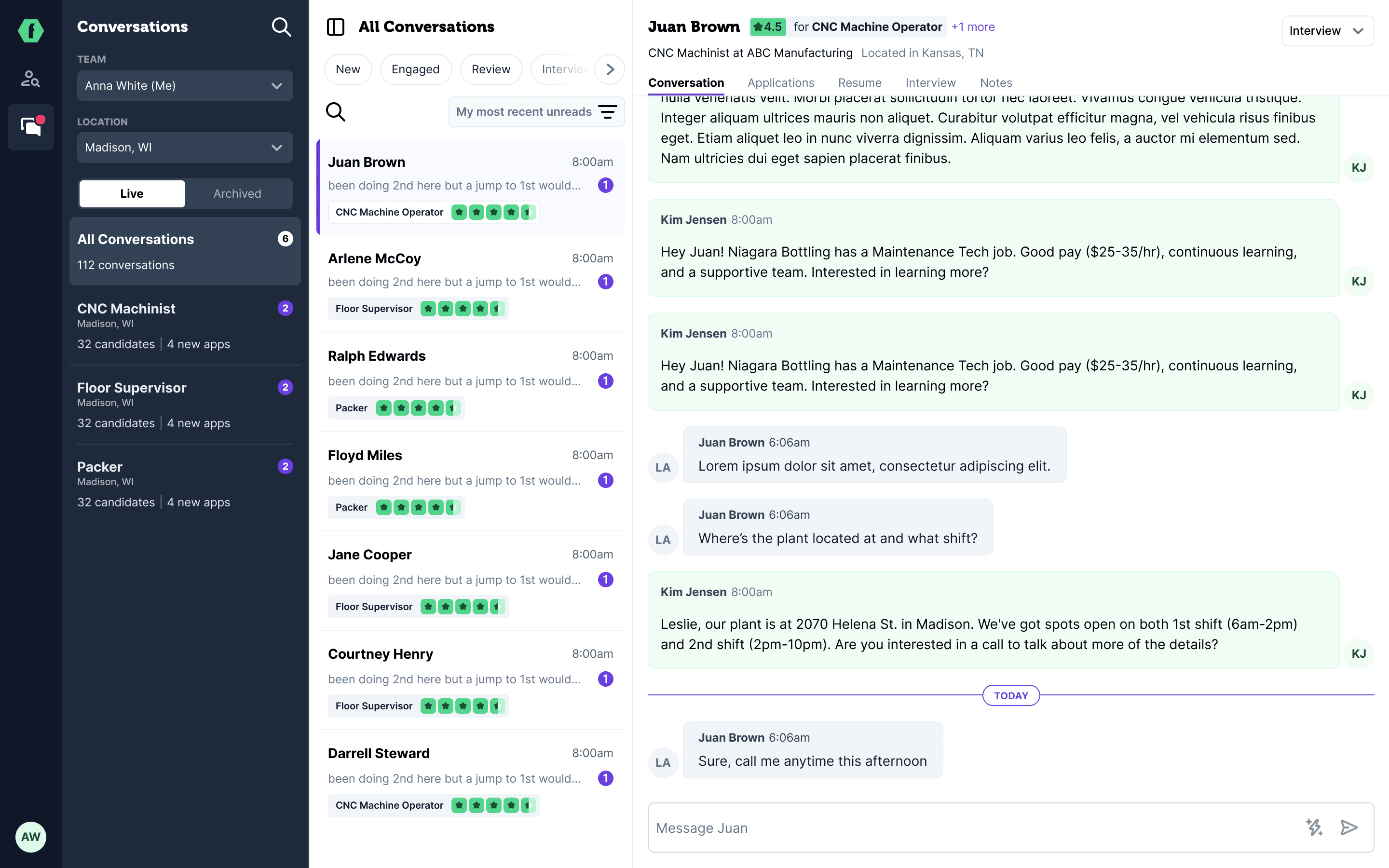
Surfacing jobs filters (Column 1) - We used the space provided by removing the Candidate Information Panel to better surface the jobs filter. This allows users to easily filter jobs by who owns them, where they are (for multi-location users), and whether they're live or archived - they can also find the job through search. They can then select the job to see the candidates that applied. Users can also hide the jobs filters for when they have a lot of candidates to review and want to focus on their current task.
Surfacing sort and filtering for candidates (Column 2) - Users can now filter candidates by job and sort through them. We moved away from the hidden dropdown in the prototype and surfaced the information right at the top of the column.
Tabs to view candidate information (Column 3) - Instead of jumping back and forth between different pages (jobs page and messages page) or pop-ups to view the resume, users can now find the information they need to review candidates right from the conversations pages. This removes friction for the user's job-to-be-done and gives them all the information right at their fingertips.
Scalable - This is the first step we're taking. We have a vision to allow for integrating our in-development AI Assistant and Talent Search candidates into the messages page, but for our first deliverable we landed here. We had to give the developers something they can ship within our allotted 6 week cycles, saving the integration with Talent Search for the next cycle. To do this we had to account for scalability ahead of time, giving enough real estate for the features we were still exploring for the integration.
One more thing...
This is something simple that I'm very proud of. We had a challenge with the tabs. How do we let users both message and review the candidates at the same time?
With the original drawer view the user could read through the candidate's experience while still viewing the conversation. However, there were still limitations like not being able to view their full application or resume. We could add it in, but it wouldn't be an optimized experience as it would squeeze the content into a confined space.
Enter the always on messaging field!
No matter what tab the user switches to, the message box will follow them around. Now the user can review the candidate's application, resume, other applied jobs and more without losing the ability to message them.
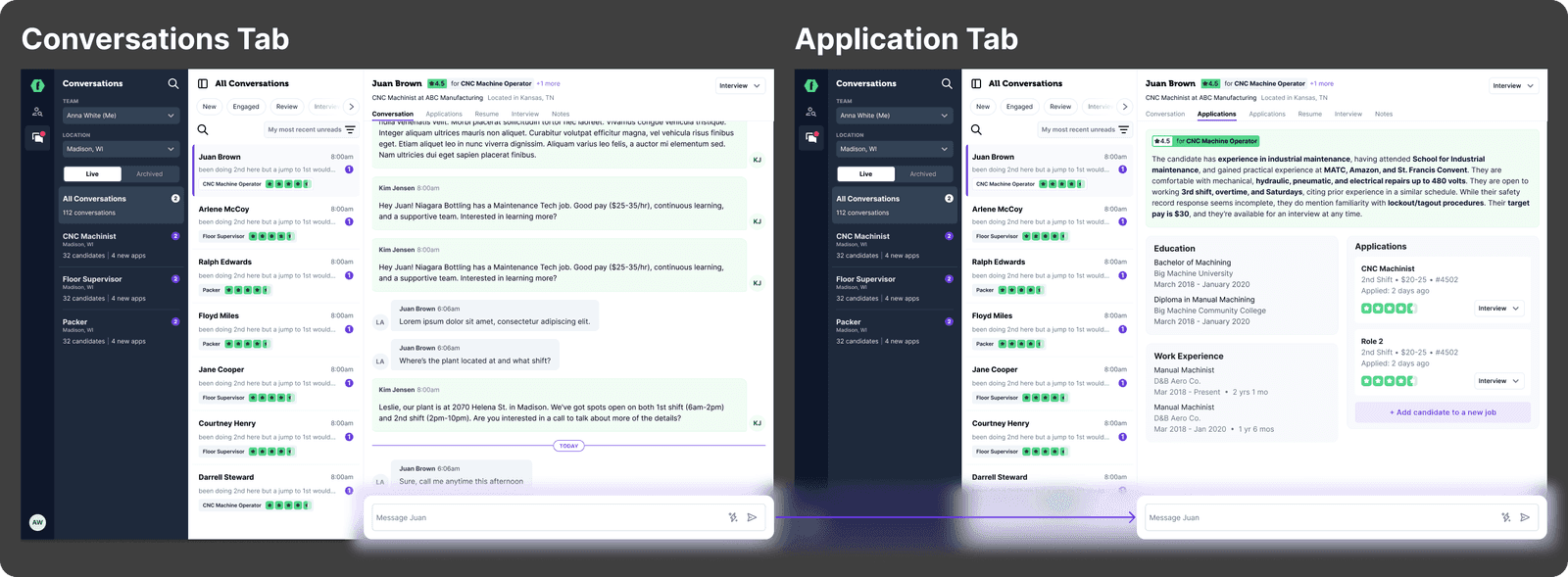
I got to this solution by exploring other products where users need context or multi-task while messaging. My first iteration was akin to a support bubble in the bottom right that would follow you around and when you click it you get a mini version of the messenger. Not only was this a big lift for engineering, but it didn't fit our design language. So I explored a messaging drawer, which just took us back to our initial issue of a layout with constrained content.
Then I asked the question - do users need to see the message log to send a message about the candidate's application? Absolutely not! The goal of messaging candidates while reviewing their application is to ask questions about their experience or education, not to respond to the candidates last message.
We then added the always on messaging field to the prototype and the users didn't have any trouble understanding how to use it. Along with that, we asked the users questions around what types of questions they ask when reviewing the candidate or if they ever do to understand whether it was useful to have the messaging field follow them around, and they told us the questions they asked most often were about certifications and prior work experience.
Now with function and purpose both validated, we delivered a design with a messaging field that follows the user through every tab.